
🇬🇧 PID manager

This page is for web designers (including myself) eager to discover (or remember) the design of this website with respect to Persistent IDentifiers (PID lien:o5wn).
PID is a concept worked out by managers of repositories for the long-term preservation of digital documents. A well-known example in academic circles is the “DOI” (Digital Object Identifier) assigned to every publication in a scientific journal.
For instance, a paper listed by Frontiers in Neurology under URL
https://www.frontiersin.org/articles/10.3389/fneur.2018.00952/full has been assigned
“doi:10.3389/fneur.2018.00952”.
Following link https://doi.org/10.3389/fneur.2018.00952 should redirect to the paper’s web page… Archive managers are aware that the target URL is bound to vary in the long term because Internet domains and paths leading to documents are not persistent. The advantage of linking via a DOI is that the registrant (Frontiers in Neurology) takes care of maintaining its redirection to a valid location. Thus, a DOI is a type of Persistent IDentifier : a long-lasting reference to a document, file, web page, or other object (lien:o5wn).
Another type of PID registration used for academic archives is the Handle system (lien:8bby). Unlike DOI, Handles are free of charge and may be set up for procedural access to archival items in an archive.
A digital object may be assigned several PIDs. Each one points at the object’s location or at another PID forwarding queries…
A ‘local’ PID service
DOIs are managed by the DOI Foundation (lien:p7it) via a technical infrastructure dedicated to publications in academic journals. However, it makes sense to create and manage PIDs on any domain which claims to be “persistent” and is used by a related device. This is the case of the leti.lt domain associated with the LeBonheurEstPossible.org website, as both are hosted on the same account.
PID manager is working on the leti.lt domain listing paths to resources cited on the website. The core of this server is a table whose records contain the unique identifier and its target URL. Every record also includes a brief description to be displayed on the title field of HTML links, and optionally a complete bibliographical reference named the content. (This vocabulary is mine.)
PIDs on leti.lt are 4‑character strings, for instance ‘dyig’ pointing at the Frontiers in Neurology paper mentioned above. Thanks to the PID resolver, link https://leti.lt/dyig should be redirected to the paper. In plain text, this is summarized as lien:dyig or link:dyig. (The word « lien » means “link” in French.)
The complete list of PIDs is available on page https://leti.lt/list. Search for ‘dyig’ to find the article cited as an example.
Below are two entries in the database, ‘6ran’ and ‘rm0y’, the former without content and the latter with a content (tagged with a red disk 🔴):

In the leftmost column, expression (lien:6ran) can be copied and pasted to any text on a website. It is a good idea to include parentheses so that it will not be truncated. Depending on the context, PID manager will decide whether these parentheses need to be preserved. Bibliographic references can be more explicit, for instance (Blekkenhorst L et al., 2015 lien:6ran).
The targets of PIDs on leti.lt should be DOIs whenever these are available. Sometimes I prefer to store the (relatively stable) URL of a publication when it leads to a downloadable version shared by the authors. It is also not certain that a DOI pointing at a preprint will remain the same after the publication. Adding to the confusion, archivists sometimes bind a DOI to the PDF full text instead of the article’s description, which is a bad practice.
A plugin Broken Link Checker takes care of signaling obsolete target URLs. On page https://leti.lt/list, admins have access to buttons opening an editor for target URLs, PID descriptions, or even to delete a PID in a secure manner.
All links of page https://leti.lt/list contain title fields. Therefore, dragging the cursor over link ‘6ran’ displays its description : “Dietary saturated fat intake and atherosclerotic vascular disease mortality in elderly women : a prospective cohort study (version 2019-12-19)”. Unfortunately, this field is deleted when pasting the link to a page in the current WordPress editor — unless copy/paste is done in HTML code… PID manager takes care of restoring titles on final links.
The date “(version 2019-12-19)” appearing at the end of a title is that of creating the PID entry.
Creating a PID
At the bottom of page https://leti.lt/list, a link can be clicked to log in as an administrator of the PID service. Links will then appear leading to the PID creation page. Suppose that we need a PID for “Jukka K. Korpela : IT and communication” whose URL is http://jkorpela.fi/. We enter the two parameters :
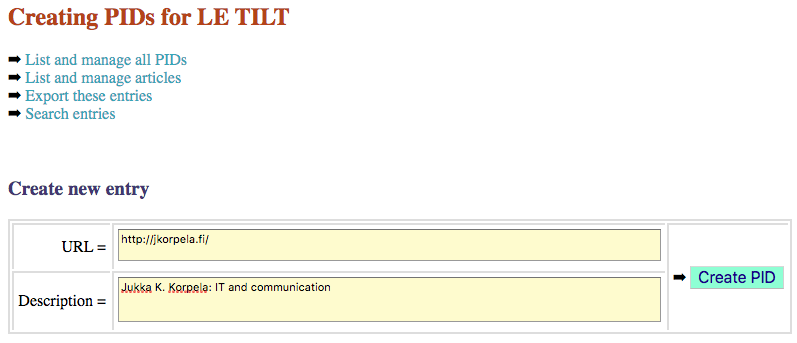
After clicking “Create PID” we see the result :
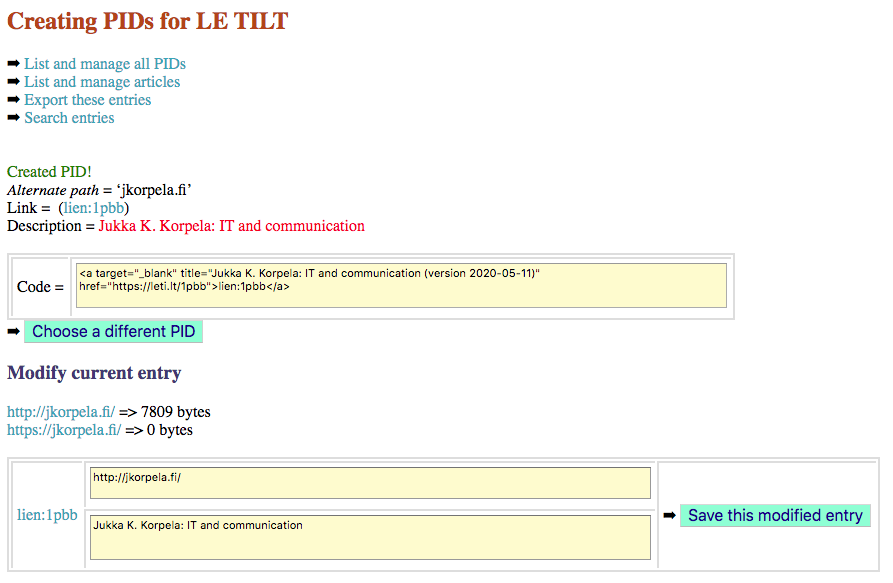
Note that the target access protocol is ‘http’, not ‘https’. The secure protocol ‘https’ has become the standard for websites though it may not have been implemented on old ones. PID manager tries to open the URL in both protocols and compares their outcomes in numbers of bytes. Whenever ‘https’ yields an equal or larger size it is recorded in the database. On page https://leti.lt/list, URLs which have not yet been accessed under ‘https’ are highlighted in yellow. The administrator needs to click an ‘update” button from time to time until the “https” protocol has been confirmed.
Whatever the protocol, PID ‘1ppb’ has now been created for Jukka’s website. Now, (lien:1pbb) takes us to the target site. In case the randomly generated code sounds weird, click ‘Choose a different PID’ to get a different one.
PID manager warns the admin in case a PID linking to the same URL is already existing. An option to change the description is offered. To achieve a suitable matching of identical targets, URLs are standardized. For instance, copying the URL of Wikipedia page « Corticoïde » makes it appear as :
https://fr.wikipedia.org/wiki/Cortico%C3%AFde
But PID manager will store it as :
https://fr.wikipedia.org/wiki/Corticoïde
which is equivalent and easier to read. This case occurs with every URL containing Unicode characters outside the English alphabet.
In addition, PID manager may cut out the end of a URL at the point it is no longer significant. This is the case with pages ending up with ‘?utmsource=…’ or ‘?fbclid=…’ — both allowing the site owner to trace whoever accessed their page !
Running PID manager
After being identified as an admin on the PID server, access is granted to the list of posts/pages with a few actionable buttons :
- “Add URL” will add to the list a page/post of the website ;
- “Delete” will suppress a page/post from the list ;
- “Run PID manager” will launch PID Manager on the page/post.
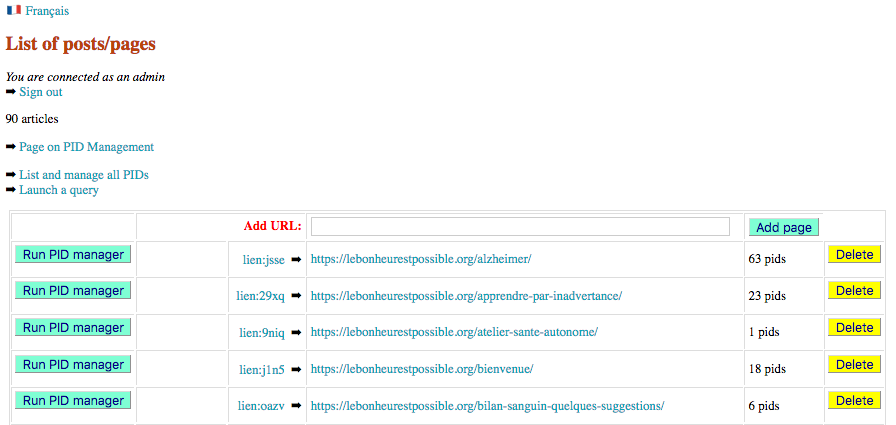
No parameter needs to be set for running PID manager as all options have already been written on the page (read below). Click “Run PID manager” close to the page that needs to be processed :

After running, PID manager displays the processed page on a new window and returns to the list of post/pages. An “Undo” button has been created, making it possible to cancel the whole operation.
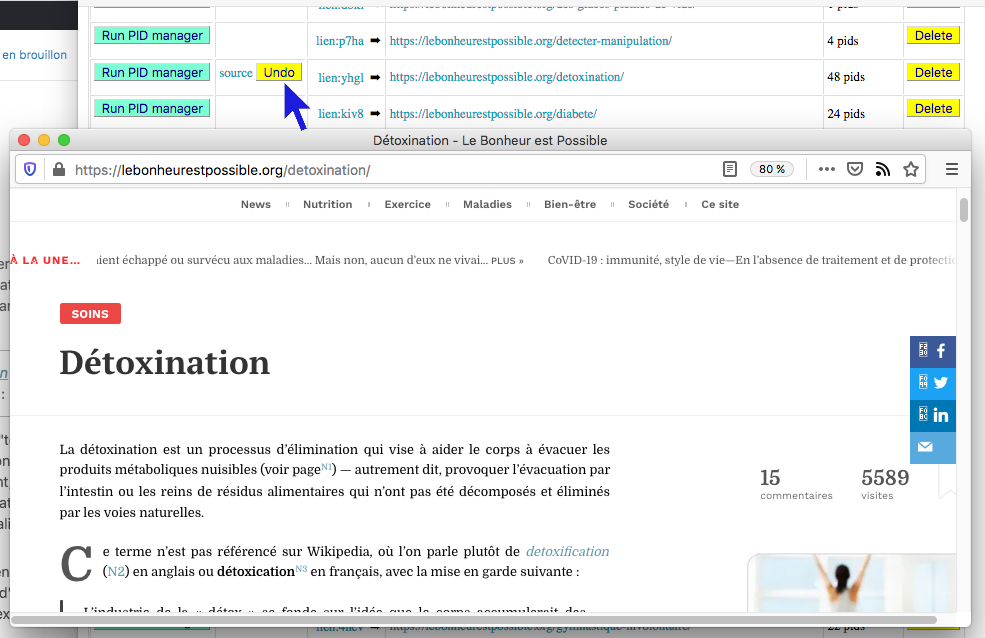
Note that PID manager works on pages and posts compliant with the current WordPress editor (Gutenberg). Warnings are displayed on attempts to run it on a Classic design.
Basic operation
Two types of text documents may be published on WordPress websites, namely pages and posts. The difference lies in classification systems. Posts use categories and tend to be listed in a chronological order, whereas pages are supposed to be permanent. These points bear no relevance to PID manager as it only takes care of the content of the page or post. In what follows, the word “page” is used to designate either type.
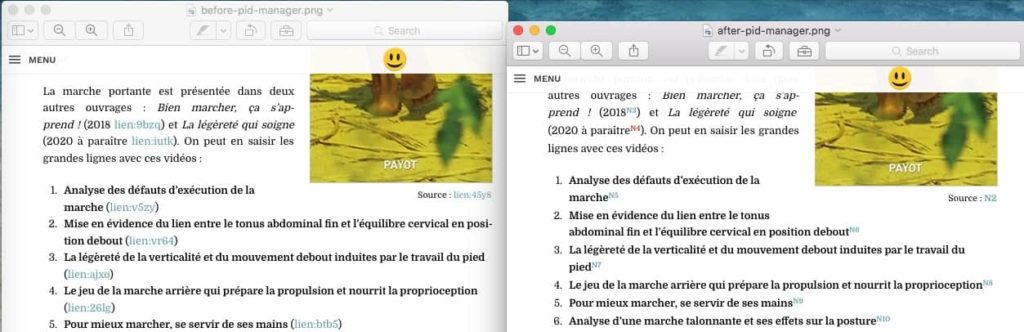
Displaying PIDs in the body of a text makes reading a bit unpleasant, as shown on the left side of the picture above. This was an incentive to implement PID manager which renders shorter links in the form of footnote calls.
Let us take for instance the sentence :
There is an escalating debate over the value and validity of memory-based dietary assessment methods (Archer E et al., 2018 lien:5ys0).
After being processed by PID manager, it will read :
There is an escalating debate over the value and validity of memory-based dietary assessment methods (Archer E et al., 2018N6).
This process takes care of (presumably) all syntactic variants, deciding to keep or remove parentheses, and where superscript is appropriate for a compact and comprehensive occurrence of the PID in its context. Mixed levels are sometimes required, such as for instance :
Une autre pathologie qui n’est pas abordée dans cet article est l’anévrisme (N8 ; vidéoN9).
French typography is not bound by the convention of Modern Language Association (lien:9t7t) stating that superscript numbers within the text should be placed outside any punctuation that might be present. This convention is followed by PID manager as an option for English text. A multilingual version is under study.
It is possible to run PID manager several time on the same page. No change will occur unless its content has been modified. Formally if we call f the function of PID manager, we can write : f ○ f = f
Uncategorized links (notes)
By default, footnote calls are labelled N1, N2 etc. and listed at the bottom of the page along with their descriptions. See for example the bottom of page Vivre bien et longtemps. Let us convene that ‘N’ means ‘note’. These links are uncategorized. Different labelings such as A1…, B1… etc. are used in specific contexts (read below).
If you don’t want to display the list as footnotes, type _no_footnotes at the end of the page. This instruction will be picked up by PID manager and saved for further use as an invisible phrase : <div id=“_no_footnotes”></div>. The phrase remains visible in the WordPress editor and can be deleted.
Links formatted by PID manager are user-friendly : they display their descriptions on “mouse-over” (the title fields of HTML links) and a new window is opened on clicking the link :
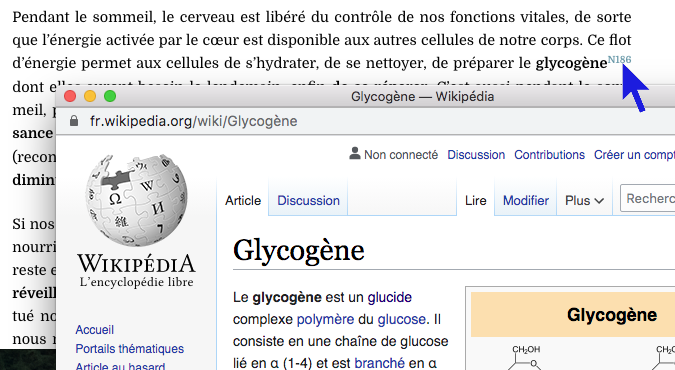
Opening new windows will work even with browsers set up to blocking pop-ups.
Categorized links (bibliographic entries)
Web pages should contain explicit bibliographic entries readable on paper prints. This is the case with page Soigner ses artères. Entries have been initially edited as follows :
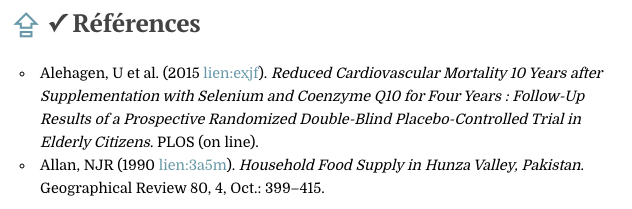
After being processed by PID manager they appear as :
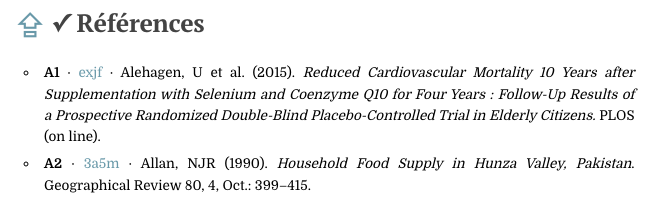
In this process, footnote calls ‘A1’ and ‘A2’ have been created which are distinct from ‘N1’, ‘N2’ etc.
In the body of the text, all calls previously labelled lien:exjf have been replaced with A1, generally displayed in superscript. Moving the mouse over ‘A1’ displays the description (title field) and clicking it opens a window containing its target.
The ‘✓’ sign close to the H2, H3 or H4 header tag of a bibliographic list (i.e. <h2>✓ or <h3>✓ or <h4>✓) tells PID manager that the list should be categorized.
➡ The ‘✓’ sign is a Unicode character, not a glyph. You may ignore the ‘⇪’ sign, an optional link jumping back to the table of contents.
PID manager does not only reshape footnote calls and entries. It also stores the full entry (the content) into the PID database. It reads the entry in the bibliography and compares its length with both the description and any content already saved in the database. The longest content is saved if it is different from the description.
Conversely, the content stored in the database will be copied to the bibliographic entry if it is longer than the current entry. This can be used to construct bibliographies in a very quick way. For instance, just type :
After running PID manager we get full entries because the contents of ‘exjf’ and ‘3a5m’ had already been stored in the database :
- A1 · exjf · Alehagen, U et al. (2015). Reduced Cardiovascular Mortality 10 Years after Supplementation with Selenium and Coenzyme Q10 for Four Years : Follow-Up Results of a Prospective Randomized Double-Blind Placebo-Controlled Trial in Elderly Citizens. PLOS (on line).
- A2 · 3a5m · Allan, NJR (1990). Household Food Supply in Hunza Valley, Pakistan. Geographical Review 80, 4, Oct.: 399–415.
Note that the garbage text written after “lien:3a5m” on this demo should be shorter than the description of PID ‘3a5m’, otherwise it would be picked up and stored as a new content.
You can create several bibliographical lists on the same page for different categories of publications. For instance, on page Statines et médicaments anticholestérol there are 3 categories of publications assigned prefixes A, B and C. You may use ‘A’ for “articles” and “B” for “books”… Since ‘N’ is reserved to uncategorized PID entries, please contact me if you need to go beyond ‘M’!
Alphabetic order
By default, categorized bibliographic entries are kept in the order they have been entered. There is an option for alphabetic sorting a bibliographical list. An example of sorted entries is page Pourquoi diminuer le cholestérol ?. Conversely, entries had been sorted chronologically in Faut-il jeter les enquêtes nutritionnelles ? and PID manager did not change their order.
To activate this option, type “_alpha” in the headers of blocks containing categorized bibliographic entries that need to be sorted alphabetically, for instance :
<h2>✓ Ouvrages _alpha
This instruction will be read by PID manager and saved for further use as an invisible phrase such as <div id=“_alphabetic_order_1”></div>. This phrase remains visible as a HTML block in the Gutenberg editor and can be deleted.
Shared bibliography
Bibliographic entries created on a page are automatically reproduced as uncategorized links (notes) in other pages mentioning the same PIDs.
Look for instance at page Cancer – conclusion et références which contains all references cited on several related pages. This page contains the following reference :
- A8 · sfm0 · Blasco, MT et al. (2019). Complete Regression of Advanced Pancreatic Ductal Adenocarcinomas upon Combined Inhibition of EGFR and C‑RAF. Cancer Cell, 35, 4 : 573–587. doi:10.1016/j.ccell.2019.03.002.
A call to PID sfm0 is found on page Cancer – nouvelles pistes and labelled “N106”. PID manager reproduced this entry exactly at the bottom of the page :
- N106 · sfm0 · Blasco, MT et al. (2019). Complete Regression of Advanced Pancreatic Ductal Adenocarcinomas upon Combined Inhibition of EGFR and C‑RAF. Cancer Cell, 35, 4 : 573–587. doi:10.1016/j.ccell.2019.03.002.
These bibliographic entries may be copied by hand on the same page to construct lists of categorized links for articles (A), books (B) etc. These will be optionally sorted alphabetically. Once an entry is listed as a categorized link, PID manager no longer includes it as uncategorized (N) — duplicating footnotes would be ugly…
The contents of these entries are synchronized each time PID manager is run on the pages on which they are displayed.
Cleaning-up references
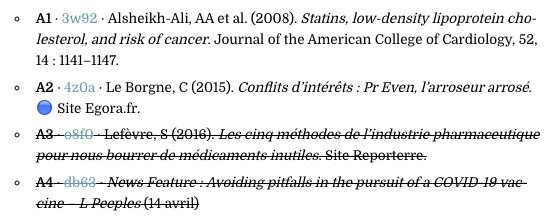
By default, PID manager cleans up references. Every categorized link (bibliographic entry) is displayed as strikethrough text if it does not appear in the text of the page. For instance :
To deactivate this clean-up, enter “_no_strike” anywhere on the page. This instruction will be picked up by PID manager and saved for further use as an invisible phrase : <div id=“_no_strike”></div>. The phrase remains visible in the WordPress editor and can be deleted.
In addition, if you want these bibliographic entries to remain unchanged on the page, type “_no_modify” anywhere on the page. Example : https://leti.lt/ljg6.
Cutting-out labels
Labels on the list of categorized links may be ignored, notably when entries are not found in the text of the page. This will yield the following :
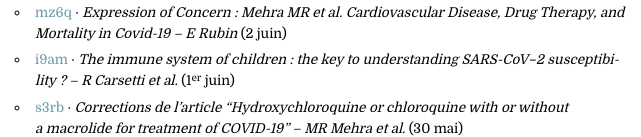
To remove labels, enter “_no_label” anywhere on the page. This instruction will be picked up by PID manager and saved for further use as an invisible phrase : <div id=“_no_label”></div>. The phrase remains visible in the WordPress editor and can be deleted.
No audio player
By default, PID manager inserts an audio player element in the page so that Meks Audio Player is displayed and fed by the sound file produced by SPEAKER — read page Lecture automatique TTS. Pages that are not subject to text-to-speech conversion can be marked with the identifier « _no_speaker » which is converted to <div id=“_no_speaker”>.
No recode + secure recovering of pages
Some pages/posts may not be eligible for being processed by PID manager. This one for instance. In order to protect them against unwanted use of the procedure, type “_no_recode” anywhere on the page. This instruction will be read by PID manager and saved for further use as an invisible phrase : <div id=“_no_recode”></div>.
PID manager modifies the text content of a page in WordPress without creating a new version in the WordPress database. It does not even modify its date of last saving. This means that if the page has been mistakenly processed it cannot be recovered in the WordPress environment. Fortunately, the program stores a backup of its original version as a text file that can be retrieved simply by clicking the “Undo” button.
Be careful that backups are overwritten each time a page is processed. It is therefore safe to check that the process has done what was expected. Even safer, keep the page opened in edit mode while applying PID manager. If the result is not satisfactory, clicking the “Update” button in the editor will return to the pre-processing version.
Table of contents
This site constructs tables of contents using the designer-friendly plugin CM Table Of Contents Pro. This page is an example of the process. The plugin builds dynamically a table of contents based on the hierarchy of <h1>, <h2>, <h3> tags. A specific marker [cmtoc_…] needs to be placed in the text at the very location the table of contents will be displayed.
PID manager looks for the [cmtoc_…] marker and performs two changes :
- It inserts a “Sommaire” line above the table of content with anchor id=“toc”. This id is used both for returning to the “Sommaire” location and formatting this word via the “toc” identifier in CSS.
- It inserts an up-arrow (⇪) at the beginning of every <h…> header linking back to the table of contents.
This table of contents feature is optional : PID manager only does this if the [cmtoc_…] marker has been found in the page.
Syntax of footnote calls
In most cases, footnote calls appear as single occurrences in a simple syntax, e.g.:
There is an escalating debate over the value and validity of memory-based dietary assessment methods (Archer E et al., 2018 lien:5ys0).
However, multiple calls may occur, for instance :
There is an escalating debate over the value and validity of memory-based dietary assessment methods (Archer E et al., 2018 lien:5ys0, lien:yhcg ; Young SS, Karr A, 2011 lien:5ep8).
After being processed by PID manager this sentence will be displayed as :
There is an escalating debate over the value and validity of memory-based dietary assessment methods (Archer E et al., 2018N9·N13 ; Young SS, Karr A, 2011N14).
Multiple entries are grouped when linked by commas or spaces, such as
Voir Archer, E et al. (2018 lien:54ji, lien:aw3j, lien:cm76 ; 2017 lien:nxg2 ou encore 2015 lien:f4st lien:ohn3 lien:s9ks).
yielding :
Voir Archer, E et al. (2018N13·N14·N15 ; 2017N16 ou encore 2015N17·N18·N19).
Many syntactic variants of multiple bibliographic calls are processed by PID manager, and a few mistakes such as an unwanted closing parenthesis may be automatically fixed. More cases will be included in the implementation whenever possible.

PID manager is not meant to fix typography. Still, it does its best to prepare the text for an automatic typography plugin such as WP-Typography. For instance, in the current version (May 2020) WP-Typography misses a closing quote in French typography when followed with a superscript (see above image).

PID manager anticipates the problem and inserts required code for a correct processing (see side image).
PID manager replaces all no-break spaces ‘  ;’ with standard spaces in the body of the text. Then it recreates the ones following digits — such as « 10_000 » or « 3_meters ». No-break spaces associated (in French) with some punctuation signs or inside French « quotes » are reconstructed by WP-Typography.
Many other “fixes” can be implemented in PID manager while being careful not to mess up page contents in future versions of WordPress and widgets handles by the Gutenberg editor.
An attempt to use narrow no-break space “  ;” in replacement of “  ;” has been abandoned because this character is not (yet?) recognized by Safari. It is also an option of WP-typography.
Security
It is clear that security procedures implemented in WordPress or added as plugins may not agree with modifications of the database done by a “foreign” script. In order to work PID manager properly it may be necessary to add exceptions to the protection system, for instance append the IP range of your DSL box to the white list of the protection device.
Current limitations
At present, PID manager modifies the following HTML code :
- <i> tags are replaced with <em>
- <b> tags are replaced with <strong>
- Some no-break spaces “  ;” may be replaced with standard spaces (read above)
- Strings of spaces are replaced with a single space
- <span> instructions inside headers are deleted
- id=“…” markers inside header tags H1, H2 etc. are deleted
The first two operations are standard in the WordPress editor. Multiple spaces are reduced to single space by WP-Typography.
To conclude…
Dealing with PIDs was my domain of expertise when working in the field of Digital Humanities (lien:wvdl). DH is an area of scholarly activity including the systematic use of digital resources in the humanities, as well as the analysis of their application. I had taken part in a French pilot project for the implementation of repositories aiming at the long-term preservation and sharing of linguistic resources. This was later articulated with the CLARIN and DARIAH European research infrastructures. For these reasons I take care in looking for the most reliable and useful bits of information and ensuring a reliable access to the same.
I invite readers and designers to send suggestions for improving PID manager. Implementation on other sites is open to discussion. Use my contact page or write a public comment at the bottom of this page…

 Partager


